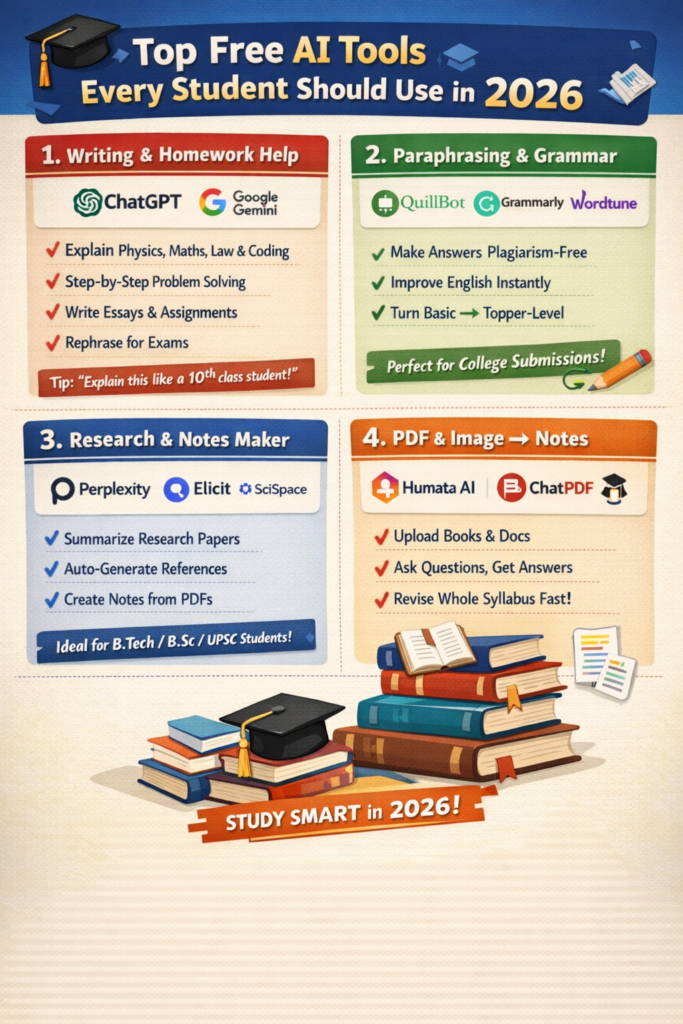
The table below organizes essential free tools by their primary academic use case to help you quickly find what you need.
| Category | Tool Name | Best For / Key Use Case | Notes on Free Access |
|---|---|---|---|
| All-Purpose Chat & Research | ChatGPT-1-2-4 | Explaining concepts, brainstorming, drafting, and coding help. A versatile “all-rounder.” | The free tier offers limited access to advanced models like GPT-5.2, with daily message caps. -1-2 |
| Google Gemini-1-4-6 | Research and writing integrated with Google Workspace (Docs, Sheets, Gmail). | The free tier includes Gemini 3 Flash and some Pro access. Students may be eligible for a free 1-year Gemini Pro Student Plan. -6 | |
| Perplexity AI-1-6 | Research with instant, cited answers. Acts like a search engine that summarizes. | Offers a generous free tier; a “Pro” version exists but isn’t needed for most tasks. -1-6 | |
| Writing & Editing | Grammarly-1-2-4 | Polishing grammar, tone, and clarity across emails, essays, and reports. | The free version catches typos and basic tone issues, working directly in your browser and Google Docs. -1-6 |
| QuillBot-1-4 | Paraphrasing sentences, summarizing articles, and checking grammar. | The free plan allows paraphrasing of 125 words at a time and summarizing texts up to 1,200 words. -1 | |
| Studying & Note-Taking | NotebookLM-4-5-6 | Creating study guides, summaries, and quizzes from your own notes, PDFs, and articles. | A completely free tool from Google that interacts with your personal documents. -4-6 |
| Notion AI-2-4-5 | Organizing notes, managing tasks, and summarizing content within the Notion workspace. | AI features are a paid add-on, but students often get free or discounted access to the premium Notion plan. -5-6 | |
| Subject-Specific Help | Wolfram Alpha-6 | Solving math, physics, and engineering problems with step-by-step solutions. | The free version is powerful for calculations and checking work. It’s known for accuracy over language-based AIs. -6 |
| AskCodi-4 | Explaining, generating, and debugging code for programming assignments. | Offers a free tier suitable for learning and smaller projects. -4 |
🧠 How to Choose and Use These Tools
With so many options, here are some key principles to get the most out of AI as a student:
- Verify Critical Information: Always cross-check facts, data, and citations provided by any AI tool. They can sometimes “hallucinate” or present outdated information-2-3. Use them as a starting point, not a final source.
- Prioritize Your Own Learning: Use AI for understanding, not just for answers-3. Ask tools like ChatGPT or Khanmigo to explain a difficult concept step-by-step, rather than just asking for the solution to a homework problem-3-5.
- Understand Your Institution’s Policy: Before using AI for graded work, check your school or university’s official policy on AI assistance to avoid unintentional breaches of academic integrity-3.
- Leverage Student Deals: Many companies offer special programs. For example, Google’s Gemini Pro Student Plan provides a free year of advanced access-6. Always look for educational pricing or verify with your school email.
- Build a Workflow, Not Just a List: Combine tools into a system. For example, you could:
- Research a topic using Perplexity AI for quick, cited overviews-1-6.
- Upload your gathered articles and notes to NotebookLM to generate a unified study guide-4-6.
- Draft your essay with the help of Grammarly’s real-time suggestions-1-2.
- Use QuillBot to rephrase a few tricky sentences for better clarity-1-4.
💡 Final Thoughts
The most effective students in 2026 will be those who use AI as a strategic partner to enhance their critical thinking and time management-2. Start by experimenting with one or two tools from the table that match your immediate needs. As you get comfortable, you can build a personalized toolkit that helps you study smarter, not just harder-2-3.
Are you focusing on a particular type of assignment (like research papers or coding projects) or subject area? I can help you narrow down which tools would be most valuable for your specific studies.
🔬 Technical Comparison: Key Performance Metrics
This table compares core technical aspects that impact your user experience, such as reasoning ability and context window size.
| Tool / Feature | Core AI Model | Max Free Context Window | Key Technical Limitation | Ideal Use Case |
|---|---|---|---|---|
| ChatGPT (Free Tier) | GPT-5.2 / GPT-4o | ~128K tokens | Access to most advanced model is rate-limited; slower reasoning | General brainstorming, text-based tasks, coding help |
| Google Gemini (Free) | Gemini 3 Flash / Pro | ~1M tokens | Flash model is faster but less analytical than Pro | Quick research, summarizing long documents, integration with Google apps |
| Claude (Anthropic) | Claude 3.5 Sonnet | ~200K tokens | Strict usage caps on free tier; strongest at nuanced writing | Analyzing dense academic papers, creative or ethical reasoning |
| Perplexity AI | Mixture of models (GPT-4o, Claude, etc.) | Varies by model | Cannot deeply analyze your own uploaded files in free tier | Research with instant web citations, avoiding hallucinations |
| Microsoft Copilot | GPT-4o / 4-Turbo | ~128K tokens | Requires Microsoft account; integrates with Edge browser & 365 | Students already in the Microsoft ecosystem (Word, Teams, OneNote) |
Key Terms Explained:
- Context Window: The amount of text (in tokens) the AI can process at once. A larger window (1M tokens) means you can upload entire textbooks or very long research papers for analysis.
- Reasoning Speed: “Flash” models are optimized for speed on simple tasks, while “Pro” or “Sonnet” models are slower but better at complex, multi-step logic.
📈 Emerging Trends & Specialized Tools
Beyond general chatbots, these emerging areas offer targeted academic support:
- AI for Scientific Research & Data Analysis
- Consensus or Elicit: AI-powered research assistants that scan millions of academic papers to find relevant studies, summarize findings, and extract key data based on your query.
- Noteable or Google Colab AI: These notebook environments now have AI assistants that can help you write code for data analysis, explain statistical outputs, and generate charts from your datasets.
- AI Tutors with Socratic Methods
- Tools like Khanmigo (from Khan Academy) or TutorAI are designed to act as true tutors. Instead of giving direct answers, they ask guiding questions, break problems into steps, and check for conceptual understanding, aligning with academic integrity goals.
- Multimodal Creation for Presentations & Study Aids
- Canva AI & Microsoft Designer: Free tools within these platforms can generate images, design presentation slides, or create infographics from a text description, helping you visualize concepts.
- Audapolis or Notta: Convert lecture recordings or video content into accurate, searchable transcripts and summaries automatically.
⚙️ How to Evaluate and Choose the Right Tool
With many options, a systematic approach helps:
- Define the Task Precisely: Are you brainstorming (ChatGPT), researching with citations (Perplexity), analyzing a personal document (NotebookLM), or solving a math problem (Wolfram Alpha)?
- Test with a Standard Query: Try the same complex, multi-part question on 2-3 tools. For example: “Explain the theory of relativity in simple terms, then create a study plan for mastering its core principles over two weeks.” Compare the depth, structure, and usefulness of the outputs.
- Check for Integration: Does the tool fit your workflow? Gemini integrates with Google Docs; Copilot works in Word; notebook AIs work in coding environments.
- Understand the Limits: All free tiers have constraints—message caps, slower speeds, or access to less powerful models. The best tool is often the one whose free limits best match your personal usage pattern.
💎 Final Recommendations
For 2026, build your toolkit around a core “brain” (like ChatGPT or Gemini for general tasks) and augment it with specialized “tools” (like Perplexity for research, NotebookLM for studying your own materials, and Wolfram for STEM).
The field evolves quickly. To stay updated, follow reputable educational technology blogs or YouTube channels that routinely review new AI features for students.
If you have a specific academic project in mind, feel free to describe it. I can then suggest a more tailored workflow and tool combination.