
If you run any kind of business that talks to customers, you already know the problem. Emails pile up. The phone rings at the worst times. Your support team spends hours answering the same ten questions over and over again. Meanwhile, customers get frustrated when they have to wait two days for a reply about something as simple as “What is your return policy?”AI Chatbot for Customer Support Automation
This is exactly where an AI chatbot for customer support automation changes everything. I am not talking about those clunky old chatbots that only understood “yes” or “no”. Today’s AI chatbots can understand natural language, remember context, and solve real problems without a human in the loop. And the best part? They work 24 hours a day, never take a lunch break, and can handle hundreds of conversations at the same time.
In this article, I will walk you through everything you need to know about using AI chatbots to automate customer support. I will explain how they work, where they save you money, what they cannot do (yet), and how to implement one without making your customers want to scream at a robot.
Why Customer Support Needs Automation
Let me start with a simple fact. Customers expect fast answers. According to every study ever done, the majority of people want a response within an hour. But most small to medium businesses cannot afford a 24/7 support team. Even large companies struggle during peak hours or holiday seasons.
The result is a bad experience for everyone. Customers get angry. Support agents get burned out. Managers watch the ticket queue grow and feel helpless.
Automation solves this by handling the repetitive, predictable parts of support. A well‑designed AI chatbot can answer frequently asked questions, collect information before handing off to a human, reset passwords, track orders, process simple refunds, and even schedule appointments. It does this in seconds, not hours.
But here is the important part. You are not replacing humans. You are freeing them to focus on complex, emotional, or high‑value problems that actually require a person. The chatbot handles the boring stuff. Your team handles the meaningful stuff. That is the real win.
How an AI Chatbot Actually Understands Your Customers
To automate support effectively, the chatbot needs to understand what the customer is asking. This is not magic. It uses a branch of artificial intelligence called natural language understanding (NLU).
When a customer types “My package hasn’t arrived yet”, the chatbot does not look for the exact words “package” and “arrived”. Instead, it recognises the intent behind the sentence. The intent might be called track_order or delivery_status. The bot also looks for entities – specific pieces of information like an order number, a date, or a product name.
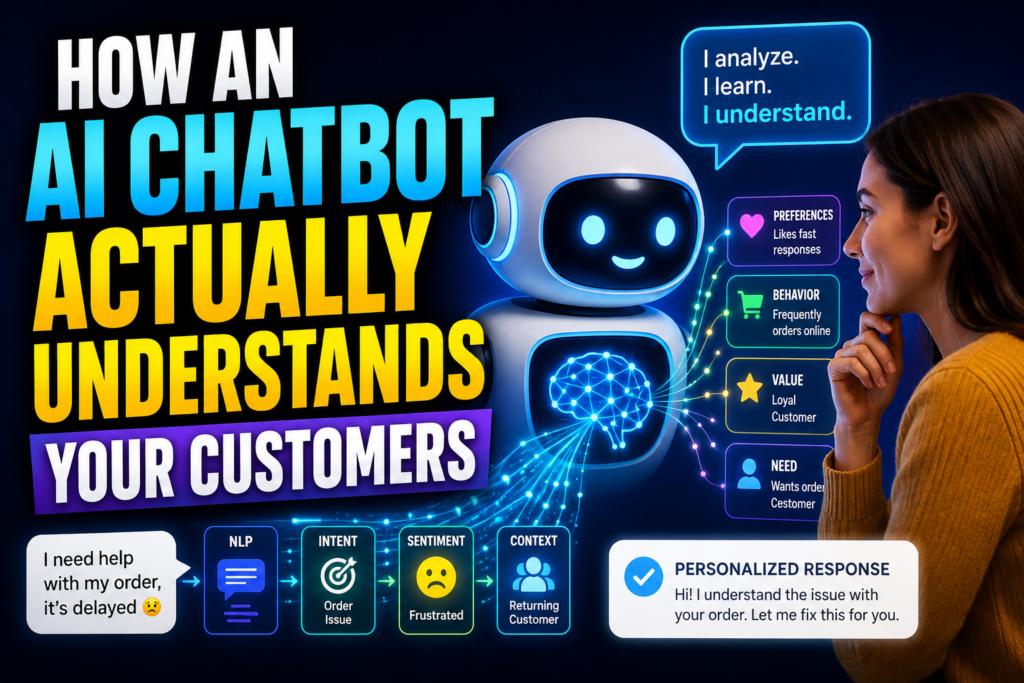
Here is a simplified example. A customer writes: “I ordered a blue sweater last week. Where is it?” The AI identifies the intent as check_order_status. It extracts the entity product = blue sweater and date = last week. It might then ask for the order number, look it up in your system, and tell the customer the current shipping status.
All of this happens without a human writing rules like “if the sentence contains ‘sweater’ and ‘where’, then do X”. The AI learns from examples. You feed it hundreds of customer sentences labelled with the correct intent, and the model learns to generalise. This is why modern chatbots can handle variations like “any update on my sweater order?” or “where did my blue sweater go?”
For a customer support chatbot, you typically train it on your actual support tickets. You take the last few thousand emails or chat transcripts, identify the most common issues, and build intents for those. Then you continuously improve the model by reviewing conversations where the bot got confused.
What an AI Chatbot Can Automate Right Now
Let me give you a concrete list of support tasks that AI chatbots handle very well today. These are things I have seen work in real businesses, not just marketing promises.
1. Answering FAQs
This is the lowest hanging fruit. Questions about business hours, return policies, shipping costs, warranty terms, pricing, and account setup. A chatbot can answer these instantly and consistently. No more copy‑pasting the same answer fifty times a day.
2. Order status and tracking
Customers ask “Where is my order?” more than any other question in e‑commerce. A chatbot can ask for the order number, pull data from your shipping carrier’s API, and show the tracking information without ever involving a human.
3. Password resets and account changes
Resetting a password is a simple, scriptable process. The chatbot verifies the user’s identity (often by sending a code to their email), then provides a reset link or generates a temporary password. This completely eliminates those “I forgot my password” tickets.
4. Scheduling returns or exchanges
Instead of making customers fill out a long form, a chatbot can ask a few questions: order number, reason for return, condition of the item. It can then generate a return shipping label and give instructions. All of this can be fully automated.
5. Cancelling subscriptions
Many customers dread calling to cancel a service. A chatbot can handle cancellation requests politely, offer retention discounts if you want, and process the cancellation immediately. This improves customer satisfaction even when they are leaving.
6. Gathering information before a human handoff
When a problem is too complex for the bot, it can collect all the relevant details first. For example: “Please describe the issue”, “What is your account email?”, “What error message do you see?”. Then when the ticket is passed to a human, they have everything they need. This saves minutes per ticket.
7. Booking appointments or reservations
If you run a service business, a chatbot can check your calendar, show available times, and book appointments. It can also send reminders and handle rescheduling.
8. Providing technical troubleshooting
For software or hardware products, many problems have known solutions. “My printer is not connecting to Wi‑Fi” can often be solved by a chatbot that asks “Is the printer turned on? Is the Wi‑Fi light blinking? Try pressing the WPS button.” The bot follows a decision tree, but it uses natural language to ask the questions.
The Real Benefits You Will Notice
Beyond the obvious “we answer tickets faster”, automating customer support with an AI chatbot brings several concrete benefits.
Lower cost per interaction – A human agent might cost 15to30 per hour and handle maybe 5 to 10 complex tickets per hour. A chatbot costs pennies per conversation once built. For simple queries, the bot is easily 90% cheaper.
24/7 availability – Your customers live in different time zones. Some people shop at 2am. A chatbot never sleeps. It answers questions at 3am on Christmas morning. That alone can increase sales and reduce abandoned carts.
Consistent answers – Humans have bad days. They get tired. They make mistakes. A chatbot gives the exact same answer every time. No variation. No forgetting to include the tracking link. This builds trust with customers.
Scalability without hiring – When Black Friday hits or your product goes viral, ticket volume might jump tenfold overnight. Hiring and training new agents takes weeks. A chatbot handles the surge automatically. You just pay slightly more for API usage, but you do not scramble to find temporary staff.
Data collection and insights – Every conversation with the chatbot is a data point. You learn what customers ask most often, where they get stuck, what problems cause frustration. You can use this to improve your product, your documentation, and your training for human agents.
Faster resolution times – The best metric in support is time to resolution. A chatbot answers simple questions in seconds. Even for complex issues, it can triage and route to the right human department immediately, cutting hours or days off the process.
What AI Chatbots Still Cannot Do
Honesty is important here. Chatbots are not magic. They fail in predictable ways, and you need to know the limits.
Empathy and emotional nuance – When a customer is truly angry, sad, or frustrated, a chatbot cannot genuinely comfort them. It can say “I’m sorry you feel that way”, but it does not feel anything. For serious complaints, billing errors, or sensitive issues, a human is essential.
Complex problem solving – If a customer has a unique technical issue that your team has never seen before, the chatbot cannot debug it. It follows patterns. It cannot innovate or try random things to see what works.
Handling ambiguous language – People speak in shorthand, inside jokes, sarcasm, or vague references. “The thing you sent me last week is busted” – the chatbot has no idea what “the thing” refers to. A human would ask clarifying questions. The chatbot will either fail or give a generic useless answer.
Multi‑step reasoning across different domains – A chatbot can track an order. It can also reset a password. But if a customer asks “My order is late and I cannot log in to check it”, that combines two intents. Some advanced bots handle this, but many fail.
Building genuine relationships – Customers do not bond with a chatbot. They do not feel loyal to a piece of software. For businesses where relationship matters (high‑end consulting, healthcare, luxury goods), over‑automation can hurt.
The smartest companies use a hybrid model. The chatbot handles the first line of support. When it detects frustration or a complex issue, it transfers to a human with full context. This gives you the best of both worlds.
How to Build Your First Customer Support Chatbot
If you are convinced and want to get started, here is a realistic roadmap. You do not need a team of AI researchers. You need a plan and a few weeks of focused work.
Step 1: Analyse your existing support tickets
Export the last 500 to 1000 tickets from your helpdesk. Read through them. Group them into categories. Which questions appear again and again? What percentage of tickets are simple FAQs? Which problems take the most time? This analysis tells you exactly where a chatbot will have the biggest impact.
Step 2: Choose your platform
For most businesses, building a custom chatbot from scratch is overkill. Use a purpose‑built platform. For smaller companies, tools like Intercom, Zendesk Answer Bot, or Tidio offer chatbot features. For larger companies with specific needs, platforms like Rasa (open source) or Dialogflow (Google) give you more control. Many of these have free tiers to start.
Step 3: Train the AI with real examples
Take the top 10 to 20 intents from your ticket analysis. For each intent, write 20 to 30 example sentences that a customer might use. Vary the wording, the order of words, the level of detail. Include common typos and abbreviations. Then feed these into the NLU engine. Most platforms have a user interface for this – no coding required.
Step 4: Design the conversation flow
For each intent, decide what the bot should do. Should it answer immediately with static text? Should it ask for extra information (like an order number)? Should it perform an action (like looking up a database or calling an API)? Map out the conversation like a flowchart. Include a clear path to a human agent when the bot is unsure or when the customer explicitly asks for a person.
Step 5: Connect to your backend systems
For the chatbot to be useful, it needs data. It needs to look up order status, check account details, process returns, etc. This means connecting the chatbot to your e‑commerce platform (Shopify, WooCommerce), your CRM, your shipping carriers, or your helpdesk. Most chatbot platforms have built‑in integrations or no‑code tools like Zapier to connect everything.
Step 6: Test with real customers before going all in
Launch the chatbot to a small percentage of your users, or only during certain hours. Watch the conversations carefully. The first version will make mistakes. It will misunderstand some questions. It will give answers that are technically correct but unhelpful. Collect these failures and improve the training data. After a few weeks of iteration, you will see accuracy improve dramatically.
Step 7: Train your human team
Your support agents need to know how the chatbot works. They should be able to take over a conversation seamlessly. They should also review chatbot conversations periodically to catch errors the automated systems missed. The chatbot is not a replacement; it is a tool that makes your team more effective.
Common Mistakes That Ruin Chatbot Projects
I have seen many companies try to automate support and fail. Here are the most common reasons.
Trying to automate too much too soon – Some people think the chatbot should handle every single conversation. That is a fantasy. Start with three to five simple intents. Expand slowly. If you try to build a bot that does everything, you will end up with a bot that does nothing well.
Not having a human fallback – The worst chatbot experience is when you get stuck in a loop with no way to reach a person. Always, always provide an obvious, easy way to talk to a human. A button that says “Talk to a person” that instantly creates a ticket or starts a live chat.
Ignoring the training data – The AI is only as smart as the examples you give it. If you give it ten sentences per intent, it will fail on the eleventh. Spend real time writing diverse examples. Better yet, use real anonymised customer queries from your ticket history.
Forgetting about context – A good conversation has memory. If the customer says “I want to return my blue sweater”, and the bot asks “What is your order number?”, and the customer replies “It’s 12345”, the bot should remember that we are still talking about the sweater return. Many simple chatbots lose context after one step. Choose a platform that supports slots and context variables.
Not measuring anything – How do you know if the chatbot is working? Track metrics: how many conversations did it handle? What percentage were fully resolved without human help? What is the customer satisfaction rating on chatbot interactions? How much time did it save your agents? Without numbers, you are guessing.
Real World Example: A Small E‑Commerce Store
Let me give you a concrete example from a real business. A small online store selling handmade jewellery was getting 200 support tickets per month. The owner spent two hours every morning just answering “Where is my order?” and “Do you ship to Canada?” and “How do I return a ring that is too small?”
She built a chatbot using ManyChat connected to Dialogflow. She trained it on five intents: order status, shipping policy, return policy, product care instructions, and store hours. She connected the order status intent to her Shopify store via API.
After two months, the chatbot was handling 70% of all incoming messages completely automatically. The remaining 30% were complex or emotional issues that she genuinely wanted to handle personally. Her daily support time dropped from two hours to twenty minutes. Customer satisfaction actually went up because people got instant answers at 11pm on a Sunday.
She paid nothing for the chatbot except a small monthly fee for the ManyChat pro plan once her volume exceeded the free tier. The return on investment was massive.
Measuring Success: The Metrics That Matter
When you automate customer support, do not just count how many tickets the chatbot answered. Look at these key metrics.
Automation rate – What percentage of total conversations are fully handled by the bot without human intervention? A good target is 50% to 70% for a well‑designed bot focused on simple intents.
Deflection rate – How many tickets would have gone to a human if the bot did not exist? This is the cost saving number.
Resolution time – How quickly does the bot resolve a query compared to a human? Usually seconds versus minutes or hours.
Customer satisfaction (CSAT) – After a chatbot interaction, ask “Was this helpful?” with a yes/no or 1‑5 scale. If your bot scores below 80% positive, you have work to do.
Escalation rate – What percentage of conversations end with the customer asking for a human? A high escalation rate means your bot is failing.
Agent time saved – Multiply the average handle time of a ticket by the number of tickets the bot solved. That is how many hours you gave back to your team.
The Future of AI in Customer Support
The technology is improving fast. Today’s chatbots use large language models (the same technology behind ChatGPT). They can understand longer sentences, follow more complex instructions, and even generate natural‑sounding responses on the fly. The next generation of customer support bots will not need explicit training on every possible intent. You will just give them your product documentation, your return policy, your shipping FAQ, and they will answer questions by reading and reasoning.
But even with all that power, the human element will not disappear. People will always want to talk to a person when something truly matters – when they are angry, when they lost money, when they are grieving, when they need advice that only experience can give. The AI chatbot is not taking over customer support. It is taking over the boring parts so that human agents can do the work that actually requires a heart and a mind.
Getting Started Today
If you are reading this and thinking “I should do this”, here is my advice. Do not overplan. Do not spend three months researching platforms. Pick one simple problem that annoys you every day – like answering “What are your hours?” or “How do I track my order?” – and build a chatbot that solves just that one thing. Use a free tool. Launch it in a week. See what happens.
You will learn more from that one tiny bot than from reading a hundred articles. And once you see how well it works, you will wonder why you did not do this years ago.
Customer support is not a cost centre. It is a relationship centre. Automating the routine gives you the time and energy to build real connections with your customers when they need you most. That is the promise of AI chatbots done right.